Search within this blog:

Custom Search
Showing posts with label Others. Show all posts

Thursday, November 18, 2010

DiGi New Prepaid Plan - DiGi Easy


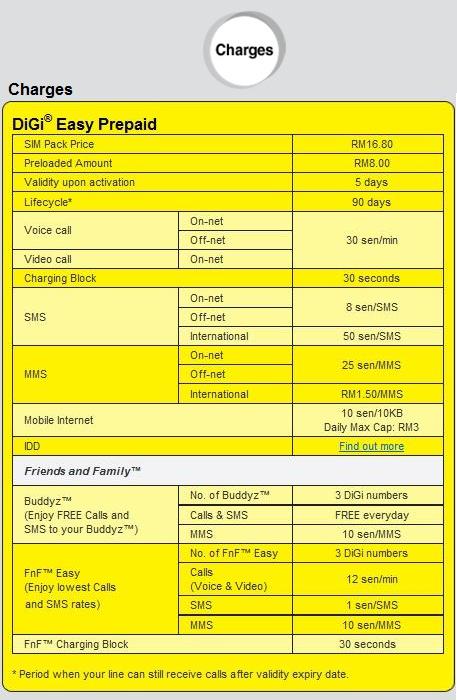
Recently DiGi come out with a new prepaid plan that call as DiGi Easy Prepaid.


The most attractive part of this prepaid plan is the user can Call & SMS to 3 buddies for FREE after setting has been made.

Other features of this prepaid plan will be, the user can set another 3 Friends & Family for lower Call & SMS charges (lesser than normal DiGi Prepaid plan as for 11 F&F can be set).

Also for every RM10 reload, DiGi will reward 10 free SMS to any network (max 30 free SMS for one time reload, even user reload RM40 will get only 30 free SMS).


Must read notes!

1. Buddyz
  • Buddyz is applicable to any DiGi number regardless of plan.
  • First registration of 3 Buddyz number is FREE.
  • Once the Buddyz list has been determined, unlimited change of Buddyz numbers can be made... But
  • Each subsequent change to any number within the Buddyz list will cost RM10/slot. (That mean don't simply set your buddyz number or else you will have to pay everytime you make a changes!)

2. Free SMS
  • The free SMS given by DiGi will not expire.
  • For reload amount RM9.99 and below, no free SMS will be given.
  • For reload amount RM30 and above, max 30 free SMS will be given as mentioned on top.
  • To check balance of free SMS, key in *128*1*5#.

3. Personally I do not encourage user to surf internet by using this prepaid plan, although DiGi only charge for max RM3 per day. If user use it everyday, then will have to pay RM90 for a month. Not worth it!

Remarks: I am using this DiGi Easy Prepaid purposely on another old phone just to text and call my love one & two other buddies who using DiGi line. I think is really worth it that way, while the other phone with Maxis line is to use for normal usage.


Thursday, September 30, 2010

Zero-One-Who? Maxis New Service

After since MNP (Mobile Number Portability) started run in Malaysia, I believe that a lots of mobile users have change from one service provider to another that they believe can provide better service while retaining their existing mobile phone number.

But ever after since then, I have run into some problem. I used to call a certain friend often and we almost talked for 1 hour plus everytime but that time he was still using Maxis. One day when I receive my Maxis bill statement and I was so shocked because the bill cost was very high. After I checked the details and found out is my friend's number that made the cost fly high.

Luckily I was aware about the MNP and I called to that friend of mine asking him is that he already port out from Maxis to other service provider. My guessing was right! Then he was scolded by me for not telling that earlier to me. Haha!

After since then, I always worried when I make a call to my friend and the first thing after they answer my call, I will ask them are you (still) using Maxis? Sounds funny right? I also know about that. xD

So that's end of the front story. Now if you have went through the same experience as me, you will now feel happy as I do because Maxis had come out with a extraordinary service that name: Zero-One-Who? or Number Look Up.

Lets see the picture below and you will understand what is this service about and I believe all the Maxis/Hotlink users will be happy about that!


So, what you think about this service? Isn't that it is consider as something good?!

If you have some questions about this service. You may check the following picture too!


The answer for number 7 question is not correct. I believe that after you had port out from Maxis and switch to other service provider, then you are not able to use this service anymore. Hopefully that Digi, Celcom & U-Mobile will be able to catch up with Maxis soon enough.

Lastly, I would really hope to get your comments about this Zero-One-Who? service by Maxis. Do you think this is useful or it is just some rubbish service?


Tuesday, September 28, 2010

iPhone 4 Malaysia: DIGI vs MAXIS

Recently the iPhone 4 had officially launched at Malaysia and make all trendy people crazy until today and will continue growing. I am also a bit crazy about iPhone 4 but luckily I am holding a previous model iPhone 3GS and that cool me down a little.

As we know, Maxis and Digi are the two service providers that selling iPhone 4 and also coming out with some interesting plans. After few days of researching, asking and understanding. I have come out with my own comparison between this two service provider's plan, but only choosing from 1 of their plan to discuss.

Before we proceed to the comparison table below, please understand the following:

1. M to M --- Maxis to Maxis.
2. to all --- to all network.


From the table above, we can find out that by subscribe to Digi's plan, we can save RM 9.70 for each month compare to Maxis's plan. In other way, we will save RM 232.60 in this two years. Not a big nor a small amount, depends how you think, but to some people they will still like to save this RM232.60.

Let us see from other way, the Free Voice Call that Digi provide is 200 minutes and Maxis is 333 minutes. If you are a person that call out more, please see this case:

Case 1:  You mis-judged and taken Digi's plan. You forgot that every month your total call out time is average 230 minutes, so the calculation will be - 
230 - 200 = 30 x RM 0.15
                 = RM 4.50 x 24 (2 years)
                 = RM 108

Results: You lost RM 108 from RM232.60 that you saved.


Case 2: You're on Maxis's plan. You use iPhone to send/receive email, using Facebook & Twitter to update your status, WhatsApp and Live Messenger to keep in touch with your friends, YouTube to watch interesting videos and share to your friends. You accidently over use your data exceeded 50MB = 50000KB. 

RM 0.05 per 10KB over use. Calculation will be - 50000/10 = 5000 x RM 0.05
                                                                                             = RM 250

Results: You need to pay extra RM 250 for that. Maybe it just happened only for one month but I think that will make you suffered for that month too! For this case, actually is a little unconvincing because now is a WiFi era. Almost every place has free WiFi even in the working place, so I think the 1GB internet data should be enough.

So, it is important that you have to know what is the thing you want and need it most. The cheaper iPhone price? More free voice calls? More free internet data? or better coverage perhaps! Do not ever listen and trust blindly to the sales person, we need to be a smart consumer.

Lastly, if you think there are something not right about this post and need a correction. Please do not hesitate to leave a comment to me. If you think you like my post, please subsribe and follow my blog. Thank you!


PS: For more details comparison between Digi & Maxis Plan please click here.

Tuesday, August 17, 2010

iPhone: Change From ver. 3.1.2 to 3.1.3 Without Update The Firmware

Here is some trick that can let us have firmware 3.1.3 without updated it.

Why? Maybe some of us already used to 3.1.2 and feel comfortable with it but sometimes there is some APPS or GAMES that required 3.1.3 and we do not really want to update our iPhone to 3.1.3 because in some countries, when you have updated the firmware you will need to find a way to unlock it again. For Malaysia & Singapore users, we do not have that kind of problem because the iPhone we get is completely unlock version. So we no need to worry about the unlock things.

Alright~~~ What we need to do that:

1. Jailbroken iPhone 3.1.2 using Blackra1n & with Cydia installed in it.
2. Internet connection.


Lets get started! Now you can see my iPhone details are like following.


When I tried to install a game, it required me to have 3.1.3, as below.


Follow the steps below to gain the 3.1.3 without updating it & the modem baseband.


Step 1: Goto Cydia --> Manage --> Sources


Step 2: At the Sources page, press the Edit button follow by Add button.


Step 3: Key in the source address as below & add it. Wait for the processes to complete.


Step 4: After press the Return to Cydia button, you will able to see the source we added just now.


Step 5: Select the source and scroll the page down until you found the Fake 3.1.3


Step 6: Select it & install it.


Step 7: After installation completed, let's check it out. Version updated but modem maintain the same!!


Step 8: To double confirm that, let's try to install the game just now.


DONE!!!!

Wednesday, August 11, 2010

How To Fix Missing ASL.dll File While Running Blackra1n

Some of you might have face this problem after update iTunes to version 9.1 or 9.2. The error message you got from the windows will look like this:


To solve this problem, just move the Blackra1n executable file to following location:

C:\Program Files\Common Files\Apple\Apple Application Support

After you have moved the Blackra1n, create a shortcut by send it to desktop for your own convenient.


Try run the Blackra1n shortcut from the desktop. It will work like normal again!!


DONE!!

Search the Web